How to earn money with the TradeDiary referral program
Share your unique affiliate link, earn commission from qualifying TradeDiary yearly-plan purchases, track each recorded sale, and request an eligible payout from one dashboard.
Quick answer
Open Affiliate from the TradeDiary side navigation and copy your personal link from Affiliate Dashboard. Share that exact link. When an eligible user completes a qualifying yearly-plan purchase through it, TradeDiary records the commission after the applicable validation or refund window. Track the result in Sales Dashboard, then use Payout Details to add an Indian bank account and request a payout once your available balance reaches ₹150.
A referral signup by itself does not earn ₹200. The current Bronze-tier amount applies to a qualifying successful yearly-plan purchase. Commission levels, eligibility, and payout rules may change, so the values shown inside your Affiliate Dashboard are the final source for your account.
What is the TradeDiary affiliate program?
An affiliate or referral program rewards an existing user for introducing a new paying customer through a unique, trackable link. Your TradeDiary account has its own affiliate code. The link displayed in Affiliate Dashboard contains that code so an eligible purchase can be attributed to you.
This is different from trading income. The money comes from a qualifying TradeDiary subscription referral, not from market profits, investment returns, or the trading results of the referred person.
Share
Copy your personal TradeDiary link and send it to people who may genuinely benefit from a trading journal.
Qualifying purchase
The referred user must complete an eligible yearly-plan purchase through your link; signup alone is not a commission event.
Earn and withdraw
Recorded commission appears in the affiliate area and eligible available balance can be requested as a bank payout.
How the current commission tiers work
The standard Sales Dashboard currently shows three referral-count tiers. Your displayed tier determines the commission amount shown for qualifying referrals.
Bronze
- Up to 50 recorded referrals
- Current displayed commission: ₹200
- A signup alone does not qualify
Silver and Gold
- Silver: ₹250 after 50 referrals
- Gold: ₹300 after 100 referrals
- Check the dashboard for your current level
The Sales Dashboard states that commission is recorded only after a successful purchase and the applicable refund window. This means a newly referred account may not appear as withdrawable earnings immediately.
Open Affiliate and copy your referral link
Use the first two screenshots to show exactly where the program and personal referral link are located.
Navigate to Affiliate
From the main TradeDiary dashboard, find Affiliate in the left-side navigation and select it. This opens the separate affiliate workspace, where the menu contains Affiliate Dashboard, Sales Dashboard, Payout Details, and Affiliate FAQ.
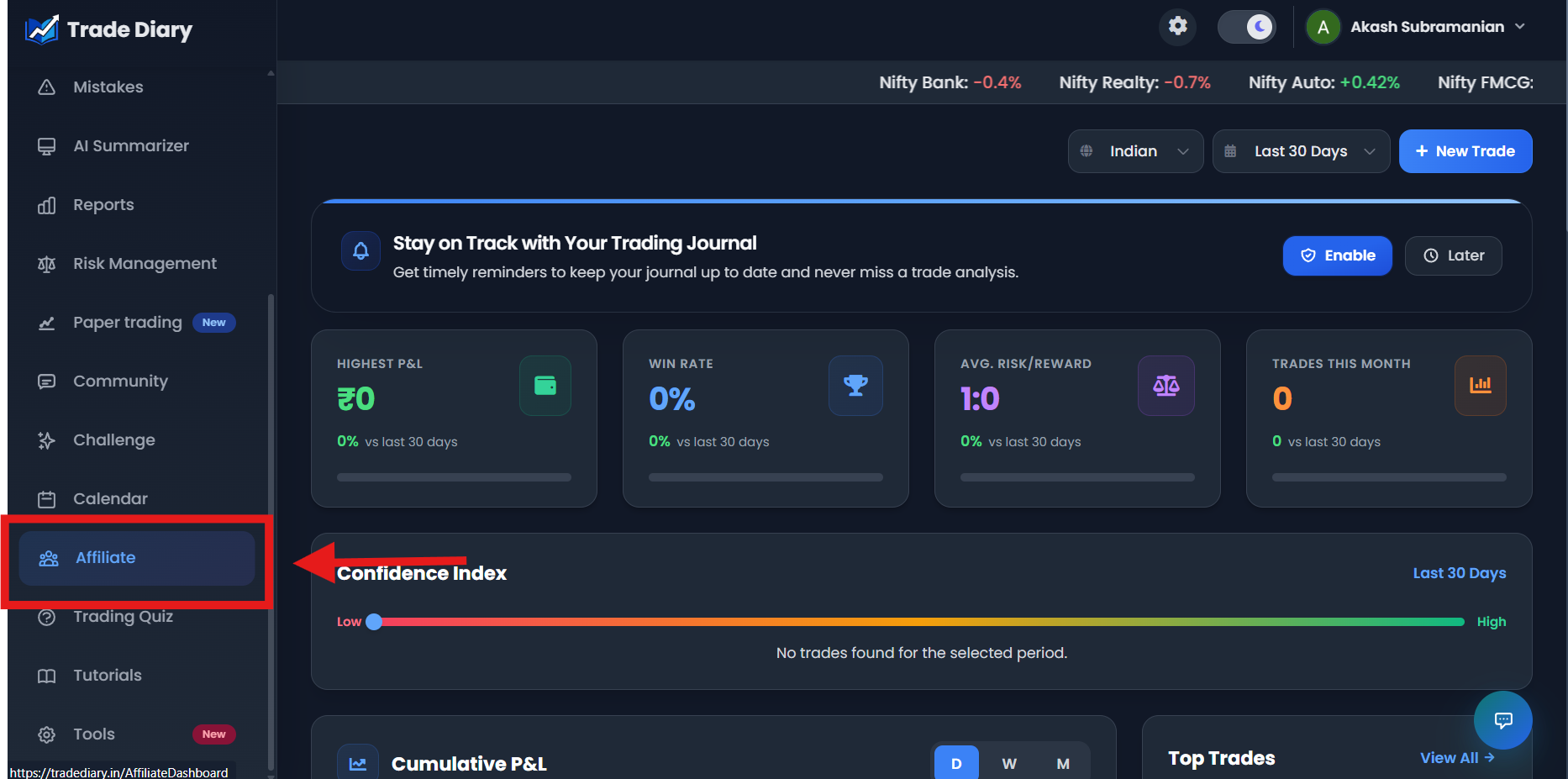
Main dashboard side navigation with an arrow pointing to Affiliate
01-navigate-to-affiliate.pngCopy your unique affiliate link
On Affiliate Dashboard, review your current commission tier, affiliate code, lifetime earnings, and users referred. In the Products table, locate the Trade Diary Affiliate Link and select Copy. Paste the complete, unchanged URL when you share it.
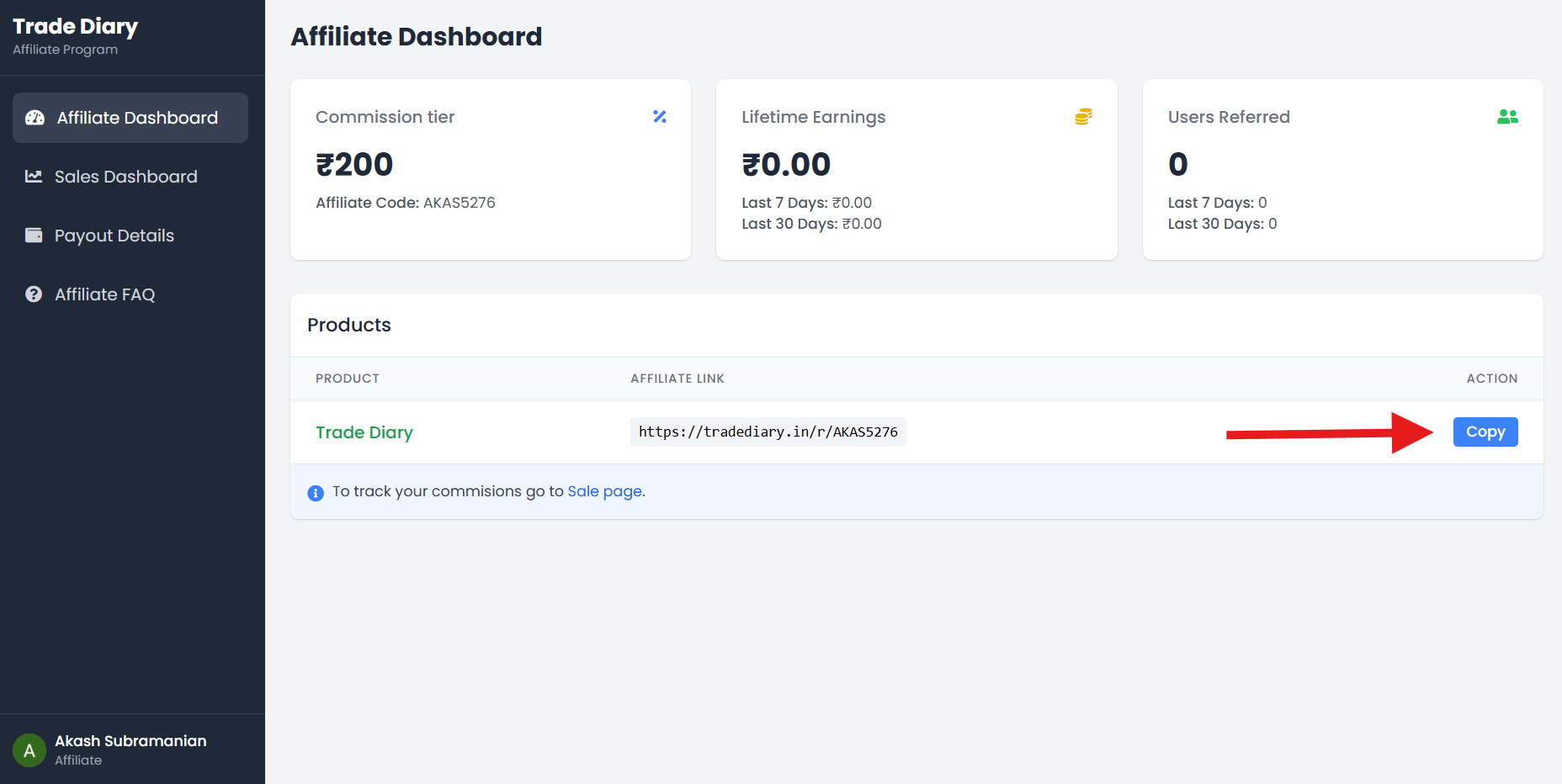
Affiliate Dashboard with the referral URL and Copy button highlighted
02-copy-referral-link.pngBefore you share the link
- Test the destination: open the copied link in a private browser window and confirm that it reaches the intended TradeDiary page.
- Explain the product: describe how journaling, review, checklists, and analytics may help; do not promise trading profits.
- Disclose the relationship: clearly state that you may receive affiliate commission from a qualifying purchase.
- Keep the URL intact: a copied or edited link without your affiliate code may not be attributed to your account.
Track sales, commission, and tier progress
Open Sales Dashboard from the affiliate navigation. Its summary shows total sales, total commission earned, the last 7 and 30 days, your current tier, and progress toward the next tier. The Sales History table lists the date, referred user, sale amount, commission earned, and status for each recorded referral.
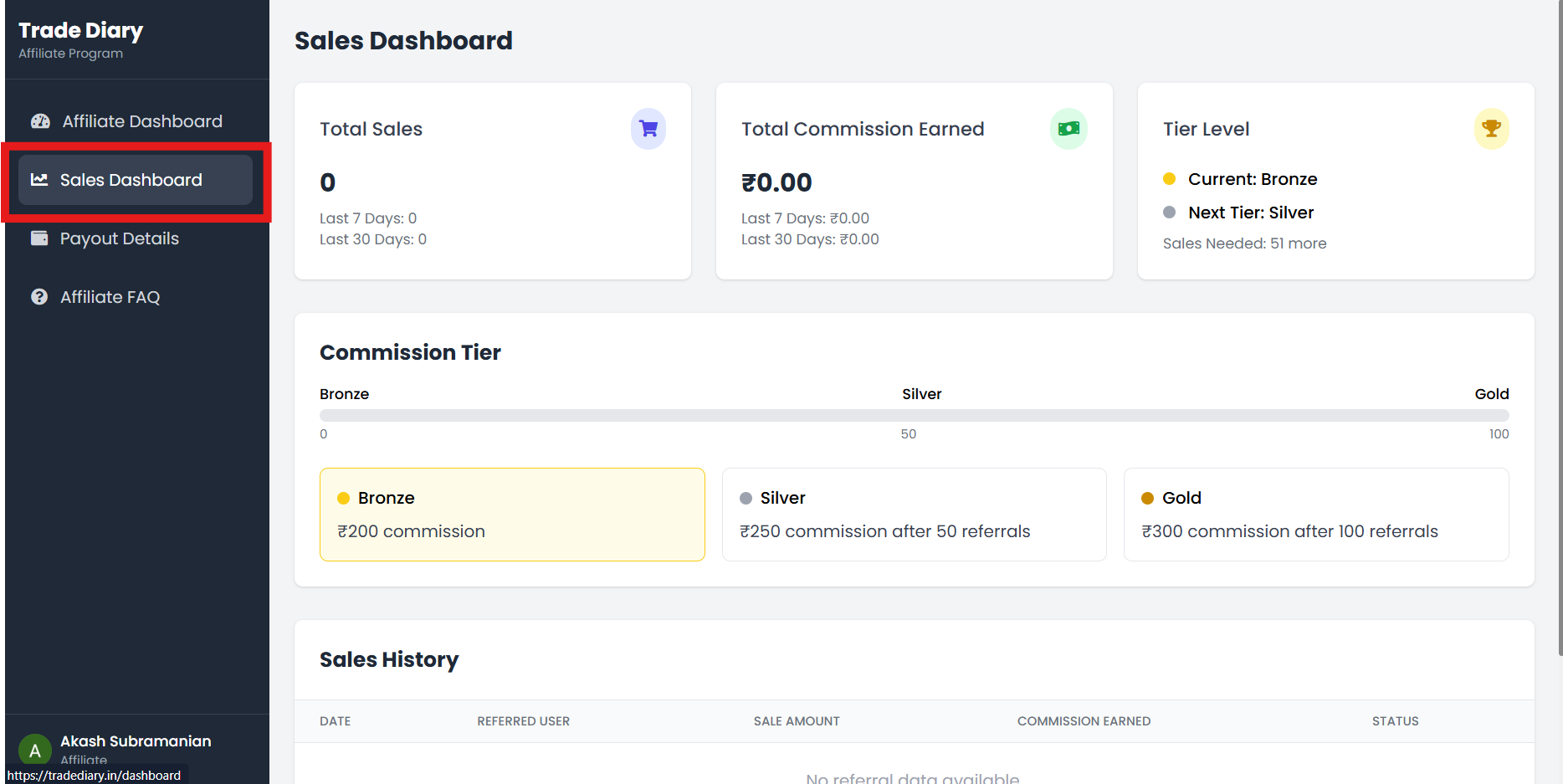
Sales Dashboard with sales, commission, tier, and Sales History highlighted
03-track-sales-and-commission.pngTotal sales
The number of referrals currently recorded as eligible sales for your affiliate account.
Total commission
Your recorded affiliate commission, with recent 7-day and 30-day summaries.
Tier level
Your present Bronze, Silver, or Gold level and the current reward shown for it.
Sales history
A row-by-row audit trail containing sale amount, earned commission, date, and status.
Add a bank account and request payout
Select Payout Details in the affiliate navigation. This page separates Available Balance, Pending Payout, and Total Earned, so do not treat lifetime earnings as the amount currently ready to withdraw.
If no account is saved, select Add Bank Account. Enter the account holder name, bank name, numeric account number, valid IFSC code, and optional branch name, then select Save Details. The current payout feature is for Indian bank accounts.
After confirming the saved details, select Request Payout, enter an amount no greater than your available balance, and submit the request. The minimum request is ₹150. A submitted amount moves to pending while it is processed, and its status appears in Payout History.
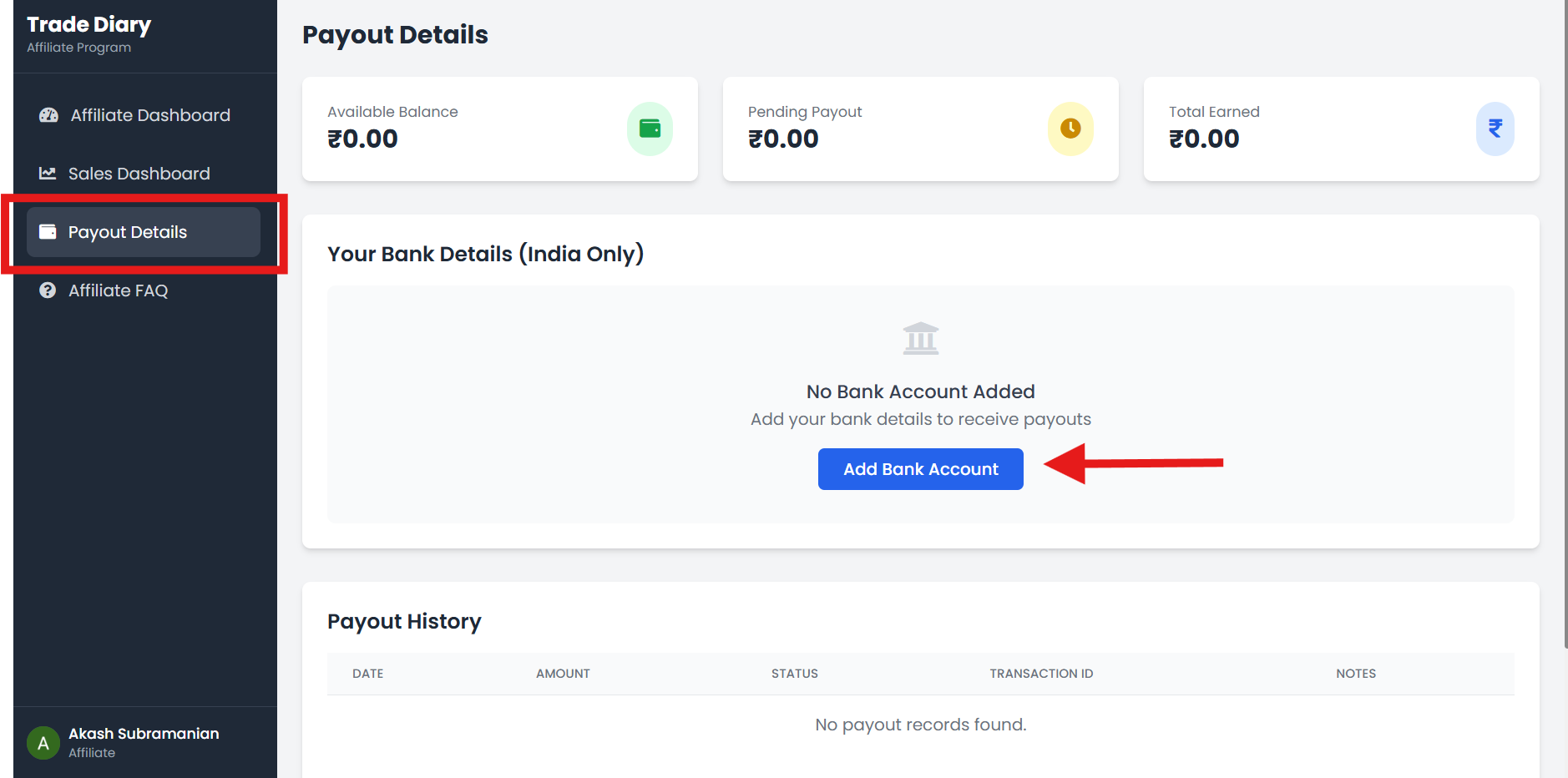
Payout Details with balance cards, Add Bank Account, and Request Payout highlighted
04-add-bank-and-request-payout.pngInformation required
- Account holder name
- Bank name and account number
- Valid IFSC code
- Branch name is optional
Current conditions
- Minimum amount: ₹150
- Cannot exceed available balance
- Processing is shown as weekly
- Follow status in Payout History
Never share bank details in a referral message or public post. Enter them only inside TradeDiary's authenticated Payout Details form, and recheck the account number and IFSC before saving.
Common affiliate-program mistakes
Expecting payment for a signup. Current commission is tied to a qualifying successful yearly-plan purchase, not account creation alone.
Changing the referral URL. Share the complete link copied from Affiliate Dashboard so your affiliate code remains present.
Counting a sale too early. Use Sales Dashboard as the record after the purchase and applicable validation window.
Requesting unavailable funds. The request must be at least ₹150 and cannot exceed Available Balance.
Entering incorrect bank details. A wrong account number, holder name, or IFSC can delay or prevent payout.
Promising earnings or trading results. Affiliate income varies, and TradeDiary does not guarantee trading profitability.
Common questions
Do I receive ₹200 when someone joins with my link?
No. Joining or creating an account alone is not enough. ₹200 is the currently displayed Bronze-tier commission for a qualifying successful yearly-plan purchase through your referral link.
Which subscriptions currently qualify?
The Affiliate FAQ currently states that the program applies to the yearly plan. Check the live Affiliate Dashboard and Affiliate FAQ before sharing because product terms can change.
How much can I earn per qualifying referral?
The standard dashboard currently shows ₹200 at Bronze, ₹250 after 50 referrals at Silver, and ₹300 after 100 referrals at Gold. The tier displayed in your own account governs the current amount available to you.
When does commission appear?
Sales Dashboard states that commission is recorded after a successful purchase and the applicable refund window. Use the sale status and wallet figures in your account to confirm availability.
What is the minimum payout?
The current minimum request is ₹150. You must have enough Available Balance and valid Indian bank details saved before requesting it.
Is affiliate income guaranteed?
No. Earnings depend on qualifying purchases and the program rules. Results vary, and neither affiliate income nor trading profit is guaranteed.
Recommend the product. Keep the promise honest.
Copy your personal link, explain the value clearly, and use the affiliate dashboards to track every eligible result.