How to use a trading checklist in TradeDiary
Turn good intentions into a repeatable daily process with pre-market preparation, post-market review, notes, chart screenshots, consistency analysis, and AI-powered insights.
Quick answer
A trading checklist is a short, repeatable list that helps you prepare before the market and review your behaviour after it closes. In TradeDiary, open Trading Checklist from the side navigation, complete today’s Pre-Market Preparation and Post-Market Review, add notes or charts, and save your progress. Use the Analysis tab to review discipline consistency and AI Analyst Insights.
What is a trading checklist?
A trading checklist is a fixed set of questions or actions you complete at the same stages of every trading day. It is not a prediction system and it does not tell you which trade to take. Its purpose is to make sure your preparation, risk decisions, execution review, and learning process are not skipped when the market becomes fast or emotional.
A useful checklist separates the day into two routines: pre-market preparation, where you define context and risk before placing trades, and a post-market review, where you record what actually happened and what you will improve.
Prepare before trading
Review context, key levels, news, focus instruments, daily risk, and mental readiness.
Protect your process
Pause before impulsive decisions and confirm that each action fits your written plan.
Review after trading
Journal trades, review charts and rules, record costs, and identify one lesson for tomorrow.
Why a checklist improves your trading
Trading performance depends on decision quality repeated over many sessions. A checklist makes that process visible. Instead of relying on memory or mood, you can see whether you prepared properly, respected risk, completed your review, and stayed consistent.
What changes when you follow one consistently?
- Fewer impulsive trades: predefined checks introduce a pause before execution.
- Clearer risk control: daily loss limits and focus instruments are decided before emotions rise.
- More complete journals: trades, charts, charges, mistakes, and lessons are reviewed every day.
- Measurable discipline: completion history shows whether your process is becoming consistent.
A completed checklist does not guarantee a profitable day. It improves process consistency—the part of trading that you can control.
What should be on your trading checklist?
Keep each item specific enough to answer with a clear yes or no. TradeDiary provides a practical default checklist for new users, and you can customise every item to match your market, strategy, and routine.
Pre-Market Preparation
- Check global indices and geopolitics
- Review Nifty/BankNifty key levels
- Analyse FII/DII data and open interest
- Check the economic calendar
- Define the daily bias: bull, bear, or range
- Select two or three focus stocks
- Set the daily loss limit
- Confirm that you are calm and ready
Post-Market Review
- Journal all executed trades
- Upload charts with entries and exits
- Confirm whether you followed your rules
- Calculate daily P&L and charges
- Identify one mistake to fix
- Identify one thing you did well
- Update the watchlist for tomorrow
How to use the Trading Checklist in TradeDiary
Follow these steps for today’s session. Your completion percentages update as you tick items, and the Save button records the current day’s checklist.
Open Trading Checklist
Sign in to TradeDiary and select Trading Checklist from the left-side navigation. The checklist opens on today’s date.
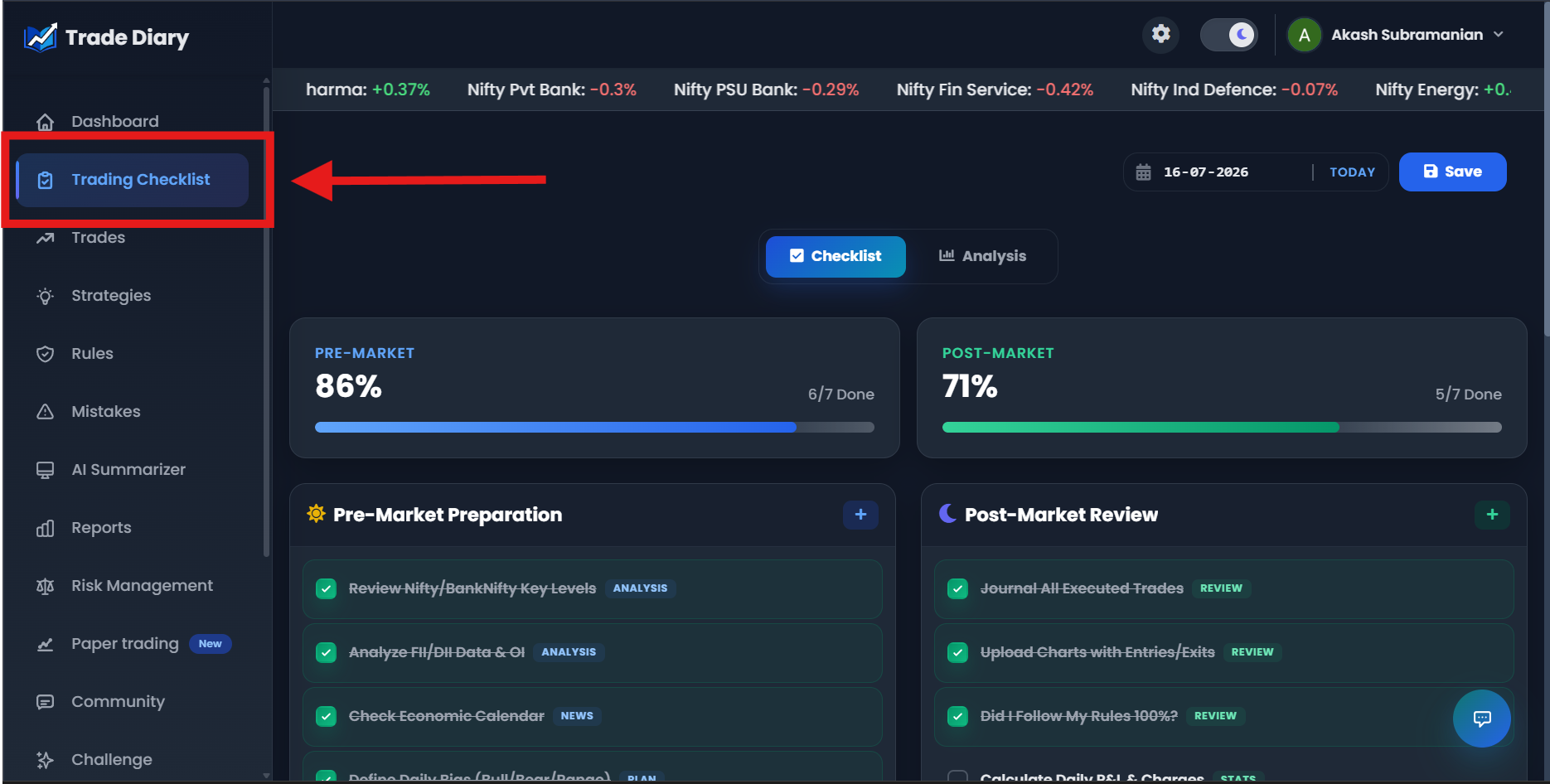
Side navigation with Trading Checklist highlighted
01-open-trading-checklist.pngComplete pre-market and post-market items
Before trading, work through Pre-Market Preparation. After the session, complete Post-Market Review. The progress cards show completed items and percentages for each routine. Select the main Save button to store today’s progress.
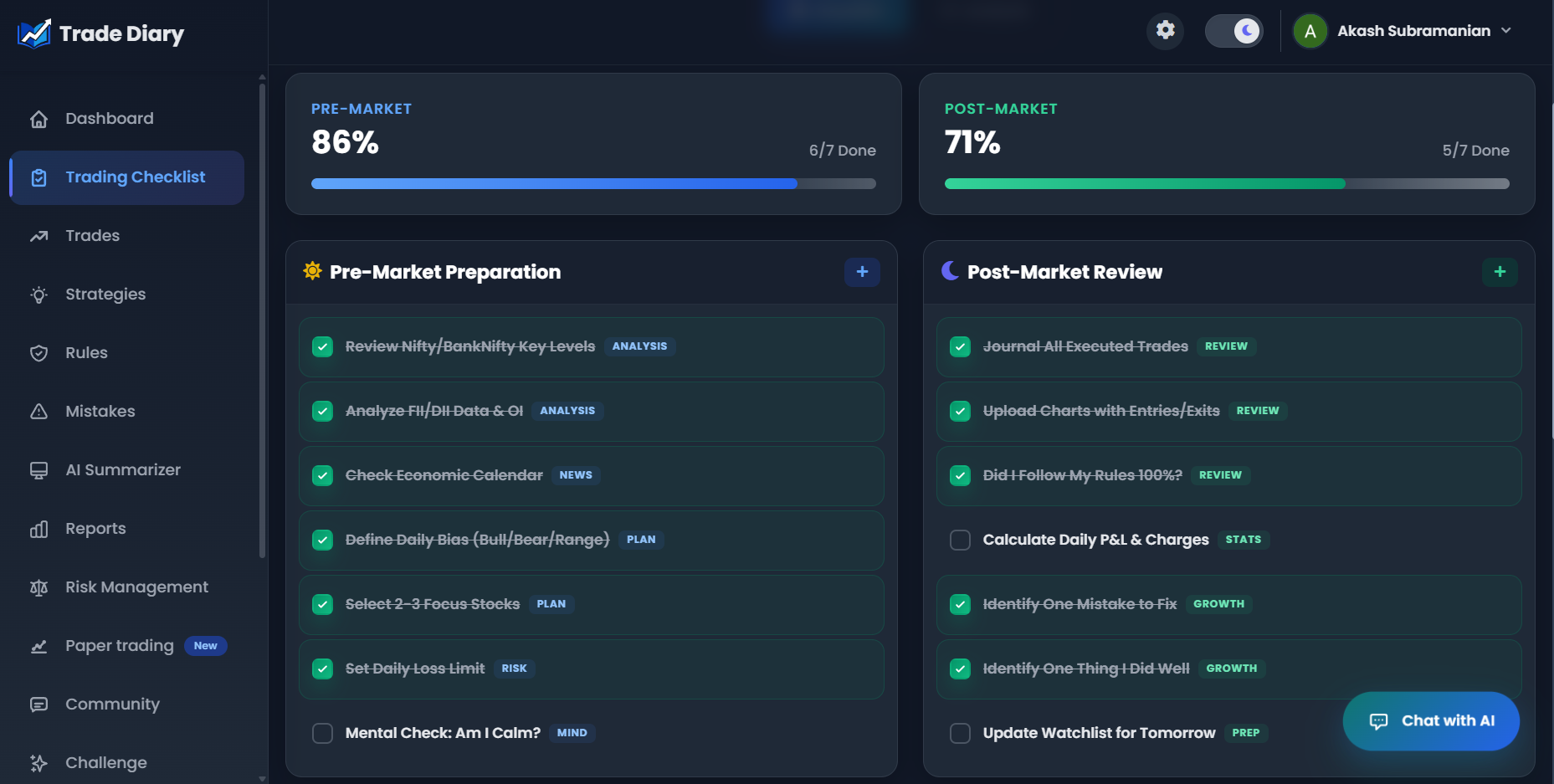
Pre-Market Preparation, Post-Market Review, and progress cards
02-pre-post-checklists.pngAdd, edit, or remove checklist items
Use + Add Item in either section to open the checklist item window. Enter a category and checklist text, then select Save. To change an existing item, hover over it and select Edit. The same window lets you update the category or text, or delete an item you no longer need.
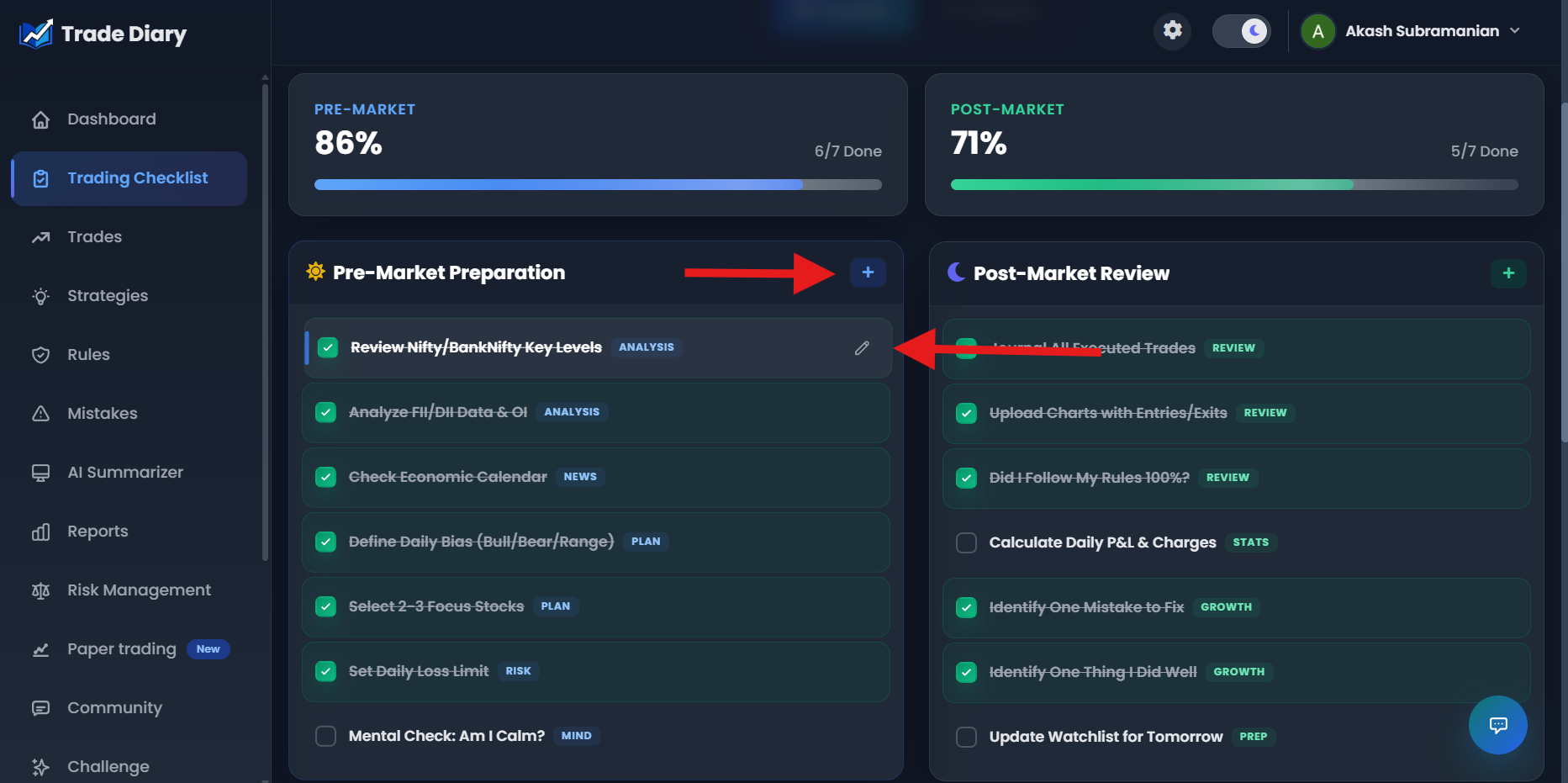
Add/Edit Checklist Item window with Category, Checklist Text, Save, and Delete
03-customize-checklist-items.pngSave daily notes and chart screenshots
Use Daily Notes & Observations to record emotions, mistakes, lessons, or market context. Under Chart Screenshots, click the upload area or drag and drop images. TradeDiary accepts JPG, JPEG, PNG, GIF, and WebP files up to 2 MB each. Select Save Notes after writing.
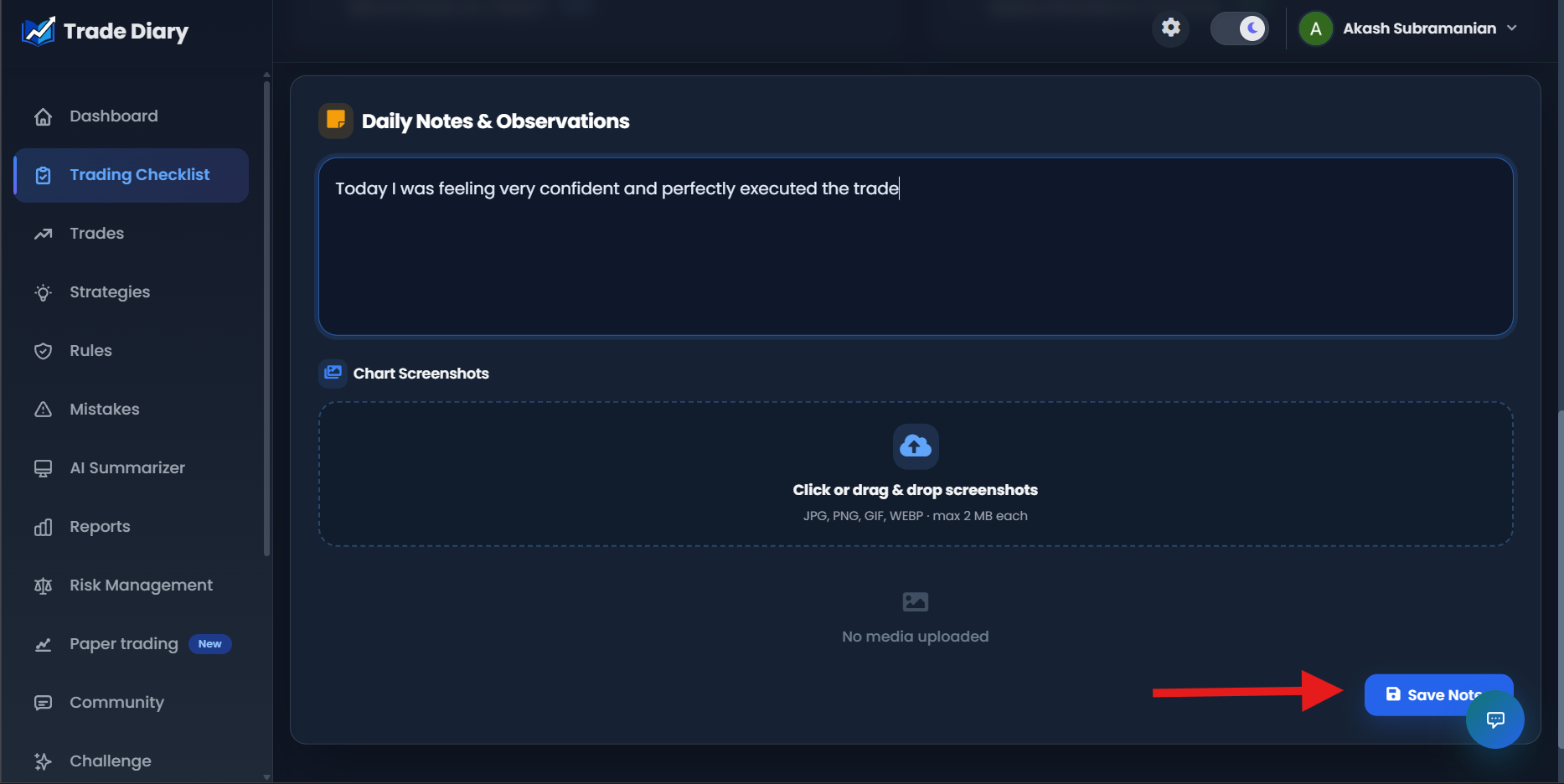
Daily Notes, Chart Screenshots upload area, and Save Notes
04-daily-notes-and-screenshots.pngAnalyse discipline consistency and AI insights
Open the Analysis tab to move from a single day to a longer-term view of your routine. TradeDiary shows your current streak, average completion, best day, total days logged, a 30-day Discipline Consistency chart, and weekday performance.
The AI Analyst Insights panel appears inside the Analysis tab. It uses recent checklist patterns to surface observations about your habits. Log at least three days of checklist data before expecting personalised insights.
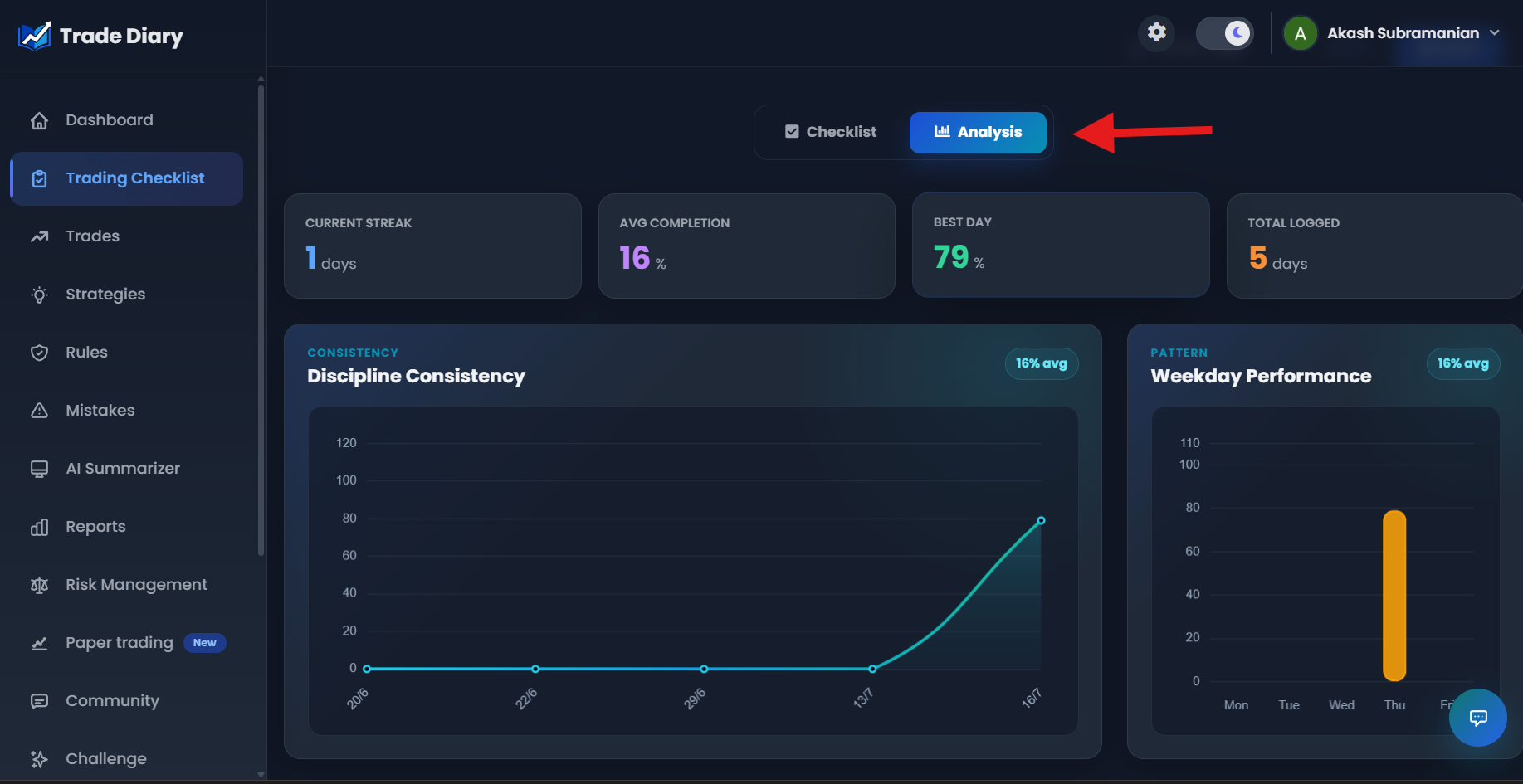
Analysis tab with Discipline Consistency, Weekday Performance, and AI Analyst Insights
05-analysis-and-ai-insights.pngAI insights become more useful as your checklist history grows. Treat them as process-review prompts, not trading signals or market recommendations.
Review a previous day’s checklist
Use the date selector at the top of Trading Checklist to open an earlier date. Historical checklists, notes, and uploaded charts are preview-only. TradeDiary hides editing controls and prevents checklist changes, uploads, and deletions for past dates.
Why is history read-only?
A discipline record is most useful when it reflects what was actually saved on that day. Preview-only history prevents later edits from rewriting the consistency record. Select Today to return to the editable checklist.
Common trading-checklist mistakes
Making it too long. Keep only checks that affect preparation, risk, execution, or review. A checklist you avoid is not useful.
Ticking items automatically. Read and answer each item honestly; completion percentage is not the objective.
Using vague wording. Replace “check the market” with a specific action such as “mark Nifty support and resistance.”
Skipping losing days. Difficult sessions often contain the most valuable notes, charts, and rule-adherence evidence.
Changing the list every day. Keep a stable core long enough to measure consistency; customise only when your process genuinely changes.
Confusing discipline with profit. A well-followed process can still have a losing day, and a poorly planned trade can still win.
Common questions
Should I use the default TradeDiary checklist?
Yes, it is a useful starting point covering context, planning, risk, mindset, journaling, charges, mistakes, and preparation. Edit it gradually to match your own instruments and strategy.
When should I complete the checklist?
Complete pre-market items before placing trades and post-market items after the session. Save notes and screenshots while the decisions and emotions are still fresh.
Can I edit or delete the default items?
Yes. Existing items can be edited, and an item you do not want can be deleted. You can also add separate custom items to the pre-market or post-market list.
Can I update yesterday’s checklist?
No. Previous dates are preview-only. Only today’s checklist, notes, and media can be changed.
Make discipline visible every day.
Open Trade Diary, complete today’s checklist, and start measuring consistency—not just outcomes.