How to use the AI Summarizer in TradeDiary
Turn a selected period of journal data into a structured review of your performance, strengths, weaknesses, next actions, and trading psychology.
Quick answer
Open AI Summarizer from the TradeDiary side navigation. Choose the relevant market and select 30 Days, 60 Days, 90 Days, or a Custom date range. Select Analyze Now, wait a few seconds, and review the generated Performance, Strengths, Weaknesses, Actions, and Psychology sections.
What is the AI Summarizer?
The AI Summarizer is a review tool that studies the trading data already recorded in your TradeDiary journal. It combines performance metrics with patterns from areas such as strategies, mistakes, rule use, risk management, emotional state, symbols, capital usage, and trading frequency, then presents the findings as a readable report.
It is most useful after you have logged enough accurate trades to reveal a pattern. The AI does not create missing information: incomplete entries, incorrect P&L, or trades saved under the wrong market can weaken the quality of the summary.
Performance
Summarizes outcomes, consistency, risk, and the overall quality of the selected period.
Patterns
Connects repeated behaviors across strategies, execution, mistakes, and psychology.
Next actions
Turns the review into prioritized ideas you can test in your trading process.
Why use an AI-assisted trading review?
A dashboard tells you what happened. A structured review helps you ask why it happened and what to work on next. The AI Summarizer brings related journal signals together so you can begin a weekly or monthly review without manually checking every report one at a time.
What a good summary can help you notice
- Repeatable strengths: behaviors or strategies that consistently support better results.
- Performance leaks: rule violations, overtrading, weak risk control, or recurring mistakes.
- Behavioral patterns: how confidence, emotion, and discipline relate to execution.
- Focused improvements: a shorter list of actions instead of trying to change everything at once.
The AI summary is an analysis aid, not financial advice or a prediction of future returns. Verify its observations against your journal and keep your own trading and risk rules in control.
Prepare your journal before analyzing
The report can only work with the trades available in the market and period you select. A clean journal gives the AI more useful evidence and makes comparisons between reviews more reliable.
Use complete, relevant data
- Log the trades from the period you want to study
- Confirm P&L, strategy, and risk details are accurate
- Record mistakes, rules, and emotions consistently
- Choose the correct Indian, Forex, or Crypto market
Small samples need caution
- One or two trades rarely establish a reliable pattern
- Missing notes limit psychology and discipline context
- Mixed markets can make the wrong period look empty
- AI output should always be checked against the data
An active subscription is required
The AI Summarizer is available to authenticated TradeDiary users with an active subscription. If the feature does not open, confirm the account and subscription status first.
Run an AI analysis in TradeDiary
Use one clear period and market for each report. This keeps the generated observations tied to a specific group of trades.
Navigate to AI Summarizer
From the TradeDiary dashboard, select AI Summarizer in the left-side navigation. This opens the AI Trading Analysis page.
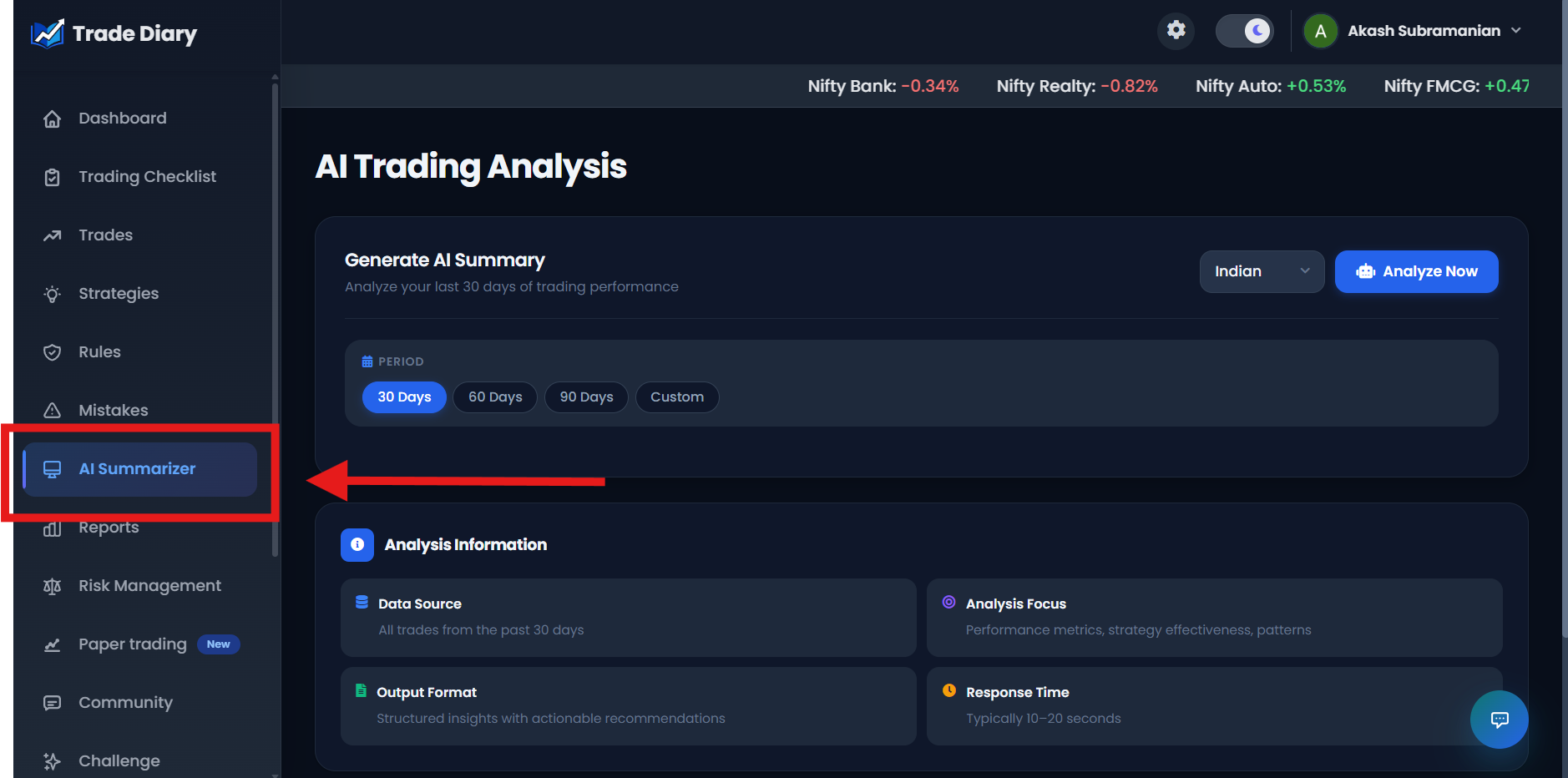
Dashboard side navigation with an arrow pointing to AI Summarizer
01-navigate-to-ai-summarizer.pngSelect a period and choose Analyze Now
First select the market that contains the trades you want to review: Indian, Forex, or Crypto. Then choose 30 Days, 60 Days, 90 Days, or Custom. For a custom period, enter the From and To dates and select Apply Range. Finally, select Analyze Now.
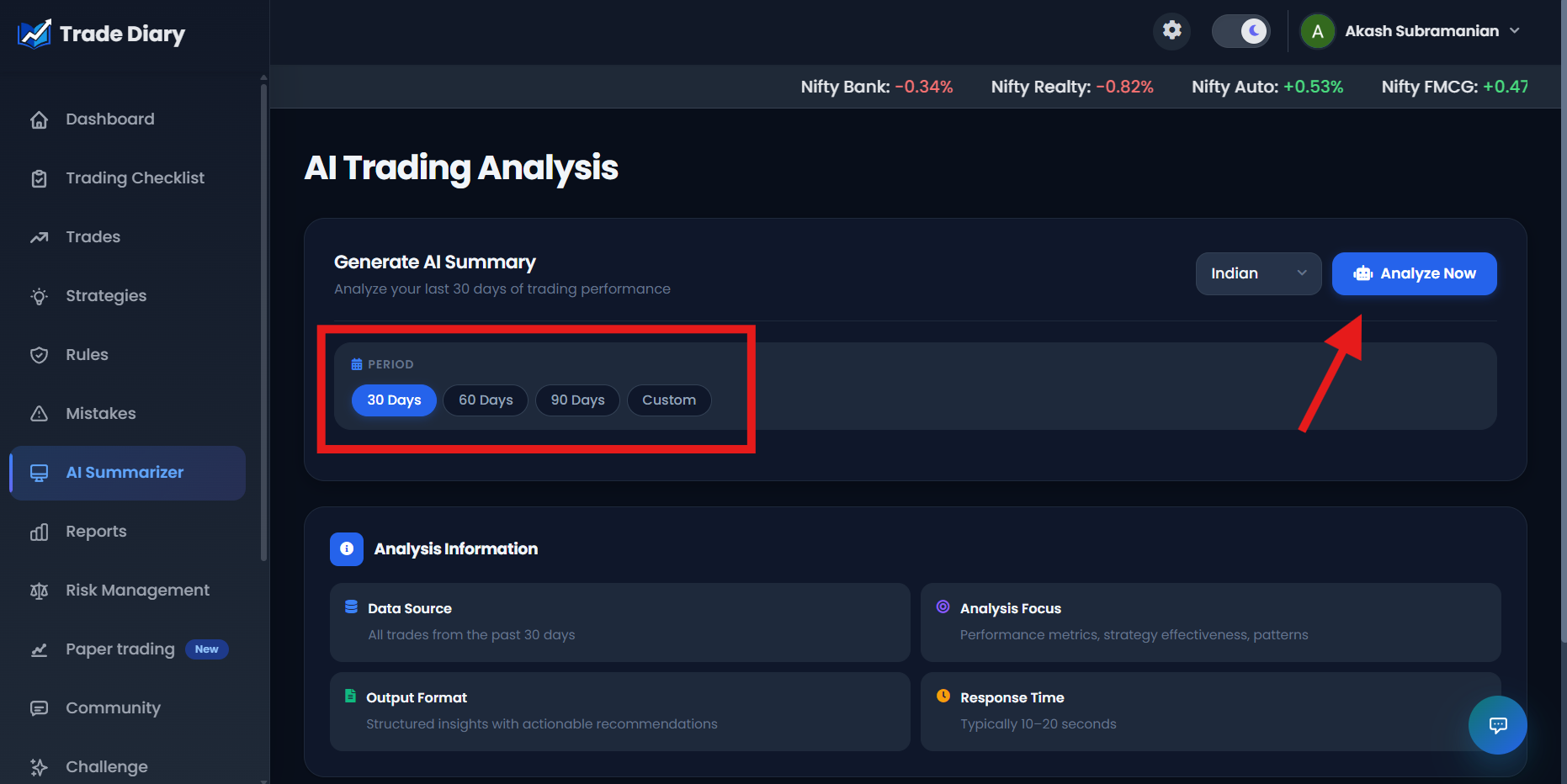
AI Trading Analysis page with arrows highlighting the period and Analyze Now
02-select-period-and-analyze.pngWait for the report and review the result
TradeDiary collects the selected trading data, recognizes patterns, generates insights, evaluates risk, and compiles the report. This typically takes a few seconds. When processing finishes, the page displays a Trading Summary followed by the AI Analysis Results.
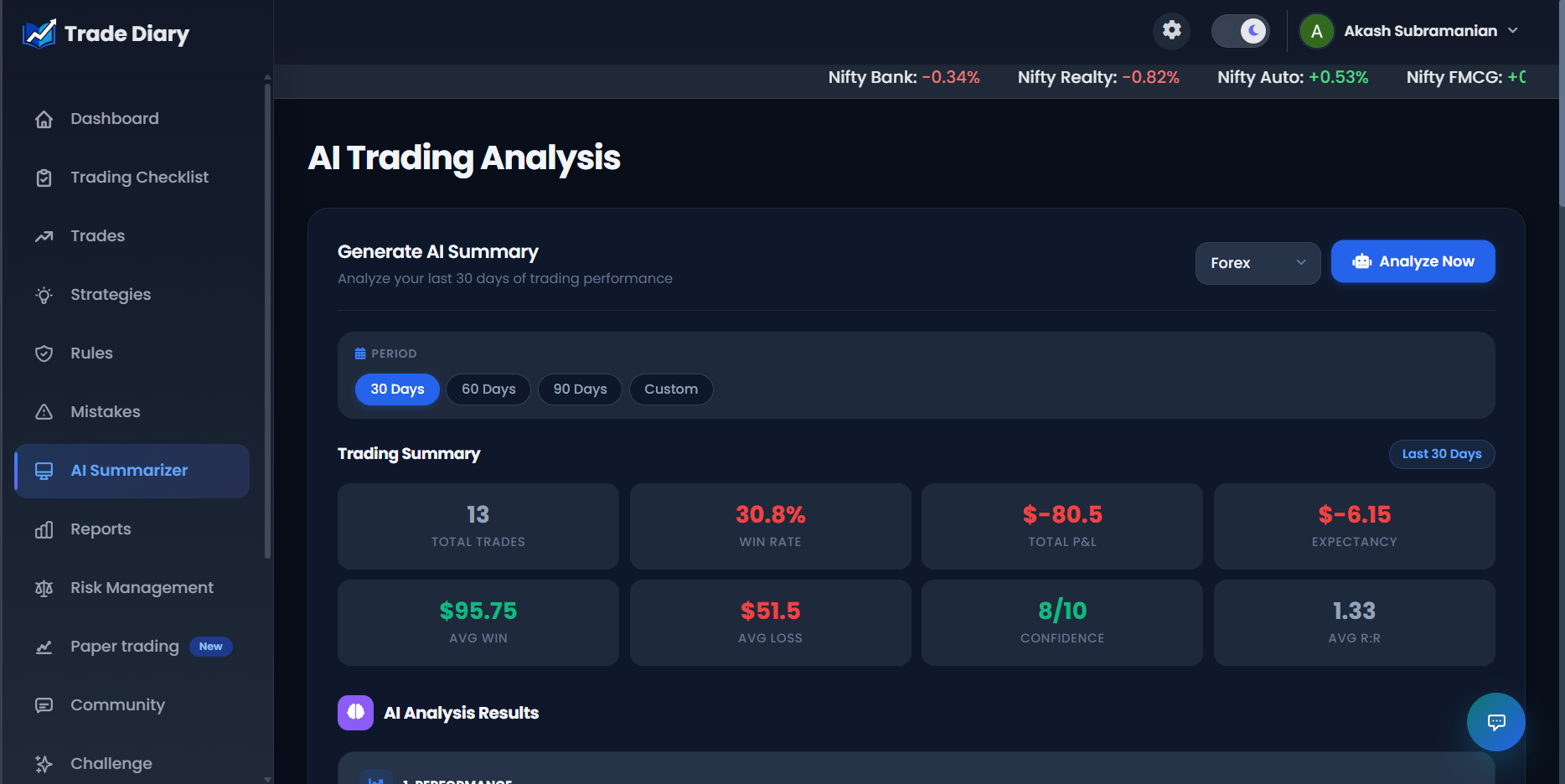
Completed AI Analysis Results showing all five insight sections
03-ai-analysis-results.pngHow to read the five AI insight sections
Start with Performance for context, then connect the other sections to it. A strength is more useful when you can identify the trades behind it, and a weakness becomes actionable only when it leads to a specific process change.
1. Performance
A broad assessment of results, risk management, capital use, consistency, and trading patterns.
2. Strengths
Evidence of what worked across strategies, risk control, execution, symbols, and emotional discipline.
3. Weaknesses
Potential leaks such as repeated mistakes, rule violations, overtrading, or inefficient risk use.
4. Actions
Prioritized improvements for strategy, risk management, psychology, and execution.
5. Psychology connects behavior with results
This section uses the emotional, confidence, mistake, rule-adherence, and discipline information available in your journal. If those details were not logged consistently, treat the psychology summary as a prompt for further review rather than a conclusion.
If TradeDiary reports that no trades were found, check both filters. The chosen market and selected period must contain at least one logged trade before an analysis can be generated.
Turn the summary into a better trading process
Reading an AI report does not improve performance by itself. Convert the most important finding into a small rule or checklist change, then collect enough new trades to judge whether it helped.
A practical review routine
- Verify the evidence: open the related trades and confirm the observation is supported by your entries.
- Choose one priority: start with the weakness that has the clearest impact and is within your control.
- Define a measurable change: add a checklist item, risk limit, or execution rule you can follow on every trade.
- Compare equal periods: run the next review using a similar market and time window.
Observation
Example: losses are concentrated on days with repeated rule violations.
Process change
Add a pre-trade rule check and stop trading after the defined daily violation limit.
Common AI Summarizer mistakes
Selecting the wrong market. Indian, Forex, and Crypto trades are analyzed separately, so confirm the market before running the report.
Using a date range with too little data. A longer period may provide a more representative sample when trading activity is low.
Treating every statement as fact. Check generated observations against the actual trades, notes, and metrics in your journal.
Changing too many things at once. Select one or two high-value actions so you can measure their effect.
Ignoring missing journal fields. Psychology and discipline insights are only as complete as the emotions, rules, and mistakes you record.
Comparing unrelated periods. Market conditions and trade frequency differ, so use comparable filters when checking progress.
Common questions
Which periods can I analyze?
You can select the last 30, 60, or 90 days. You can also choose Custom, enter From and To dates, and select Apply Range.
How long does the analysis take?
The page describes the normal response time as approximately 10–20 seconds, although actual time can vary. Keep the page open while TradeDiary compiles the report.
Why does it say no trades were found?
No logged trades exist for the selected market and period. Select another market or date range, or log the missing trades and run the analysis again.
Does the AI Summarizer predict my next trade?
No. It reviews historical journal data and generates observations and actions. It does not guarantee results or replace your strategy and risk-management decisions.
Turn your journal into a focused improvement plan.
Choose a meaningful period, generate the summary, verify the evidence, and put one useful insight into practice.