How to enable Trade Margin in TradeDiary
Record the leverage used for each trade and calculate a more realistic capital amount instead of treating every leveraged position as fully funded.
Quick answer
From the TradeDiary dashboard, select the settings cog in the top bar. In Advanced Settings, switch on Trade Margin and select Save Settings. Open New Trade and use the Leverage slider to record the value used for that trade.
What is trade margin?
Margin is the capital a broker requires you to provide to open and maintain a position whose market exposure may be larger than that capital. It is commonly used in derivatives, forex, crypto, and other leveraged products, although the rules and risks vary by broker and instrument.
TradeDiary’s Trade Margin setting does not provide margin. It lets your journal record the leverage associated with a trade and use that value when calculating the displayed Total amount for the position.
Capital used
The amount committed to support the leveraged market exposure.
Market exposure
The value of the position affected by price movement, before considering leverage.
Amplified risk
A smaller capital requirement does not make the position’s price risk disappear.
How margin and leverage relate
Leverage is commonly written as a multiplier such as 1×, 5×, or 10×. In a simplified example, a position with ₹100,000 of exposure at 10× leverage uses ₹10,000 as the calculated capital amount.
TradeDiary follows this relationship when updating the Total amount from the available trade inputs. Instrument-specific quantity and lot-size rules may also affect the exposure calculation.
Higher leverage can magnify gains and losses relative to the capital used and can increase liquidation or margin-call risk. Record the broker’s actual leverage; never select a higher number simply to make capital usage look smaller.
Why record leverage in your trading journal?
Two trades with the same P&L can carry very different capital requirements and risk. Without the leverage value, a journal may overstate the capital tied up in a leveraged position or hide how aggressively the position was structured.
What leverage tracking adds to your review
- More realistic capital usage: Total amount reflects the leverage recorded for the trade.
- Better context for returns: compare outcomes with the capital amount required to create the exposure.
- Risk-pattern visibility: notice whether losses or rule violations cluster at higher leverage.
- Consistent journaling: preserve the leverage used instead of relying on memory later.
Enable Trade Margin: step by step
Enable the preference once, then record the appropriate leverage whenever you manually add a leveraged trade.
Open Advanced Settings
Sign in to TradeDiary and open the dashboard. In the top-right area of the top bar, select the round settings cog.
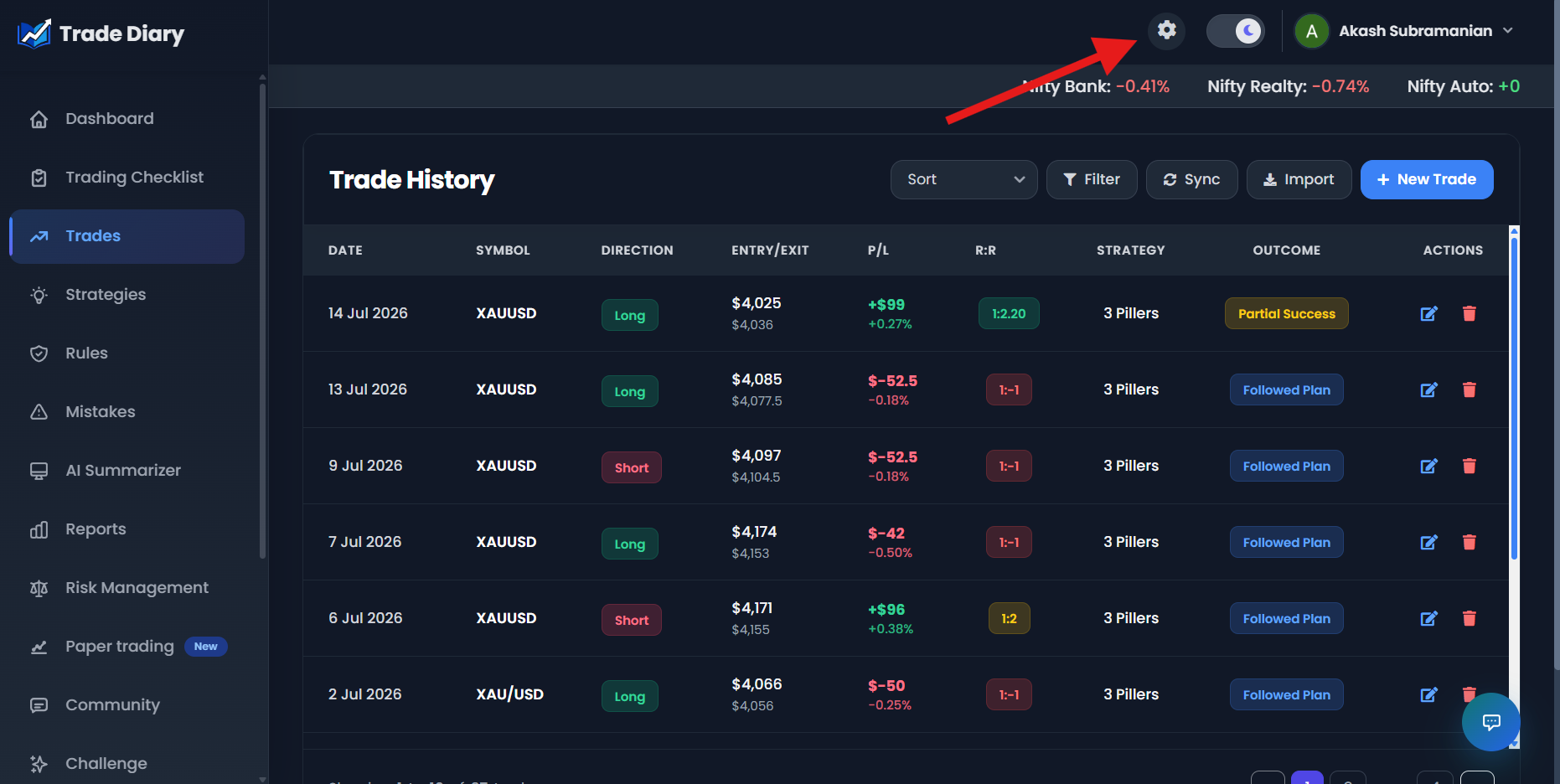
Dashboard with an arrow pointing to the Settings cog
01-open-advanced-settings.pngSwitch on Trade Margin
The Advanced Settings window opens. Find Trade Margin, described as “Set and manage margin usage for trades,” and turn on its switch. Then select Save Settings.
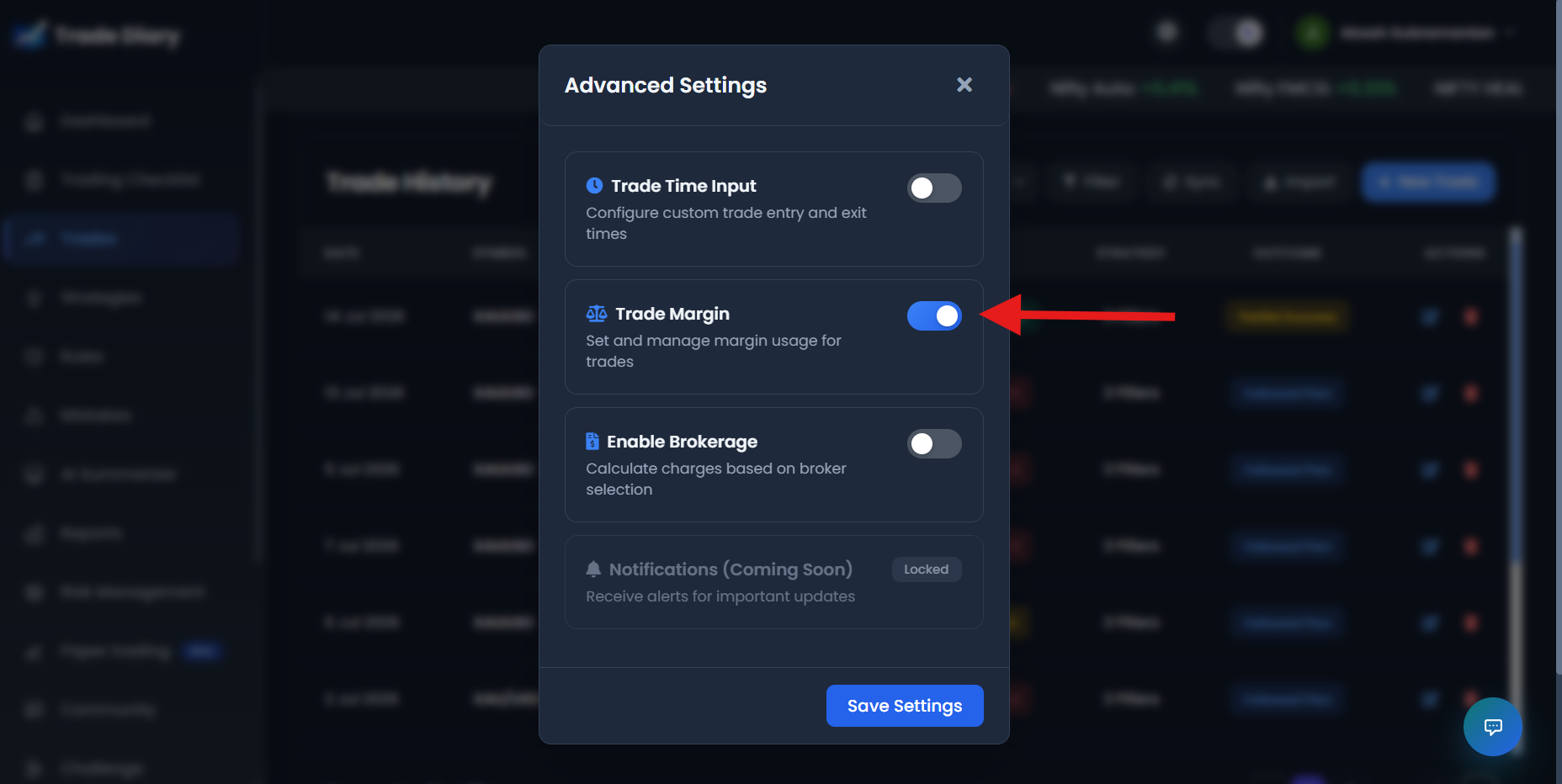
Trade Margin switched on with Save Settings highlighted
02-enable-trade-margin.pngLet the page reload
TradeDiary saves the configuration, closes Advanced Settings, and reloads the current page. The New Trade form is then ready to capture leverage.
Set leverage when logging a new trade
Select New Trade. A Leverage slider now appears in the general trade details near the price, quantity, and Total amount inputs. The control starts at 1× and supports values up to 200×. Move it to the leverage actually used for the trade.
As the leverage value changes, TradeDiary recalculates the displayed Total amount from the trade’s price, quantity, instrument configuration, and leverage. The selected value is saved with the trade.
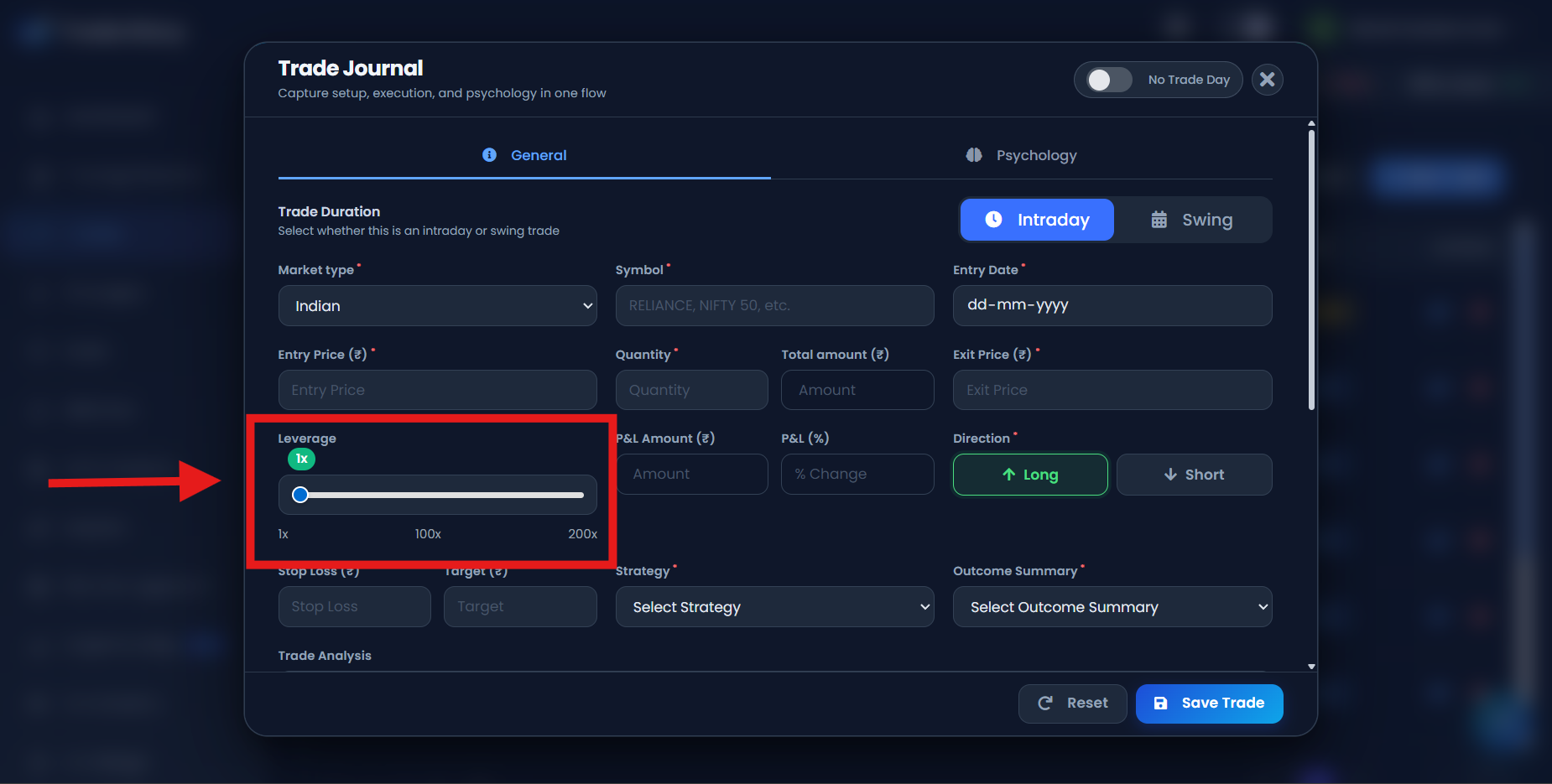
New Trade form with the Leverage slider and selected value highlighted
03-leverage-in-new-trade.pngTradeDiary records; your broker provides
Changing the slider only changes the journal entry and its calculations. It does not request leverage, alter an open broker position, or change your broker’s margin requirement.
Review leveraged trades responsibly
Leverage should be reviewed together with position exposure, stop-loss distance, P&L, fees, and the amount you were prepared to lose. Capital efficiency alone is not proof of good risk management.
Useful context
- Actual leverage from the broker
- Position exposure and capital amount
- Planned stop-loss and rupee risk
- Fees, funding costs, and final P&L
Misleading comparisons
- Assuming smaller margin means smaller risk
- Comparing leverage without position size
- Ignoring liquidation or margin-call rules
- Selecting leverage after seeing the outcome
Questions worth asking
- Does higher leverage coincide with larger rule violations or drawdowns?
- Was the leverage planned before entry or increased emotionally?
- Is the stop-loss risk acceptable relative to account size?
- Does the strategy remain viable after fees and financing costs?
Common Trade Margin mistakes
Confusing leverage with risk. Risk depends on exposure, price movement, position size, stops, and market conditions—not only the margin deposited.
Guessing the multiplier. Use the leverage shown by the broker for the actual position.
Using 1× for every trade. This can overstate capital used when the position was genuinely leveraged.
Choosing extreme values casually. The slider supports up to 200× for journaling flexibility; availability and suitability depend on the broker and instrument.
Ignoring additional costs. Brokerage, funding, taxes, and other charges can materially affect leveraged results.
Common questions
Does enabling Trade Margin give me leverage?
No. It enables leverage recording inside TradeDiary. Your broker determines whether margin is available and the conditions that apply.
What range does the Leverage control support?
The current New Trade control ranges from 1× to 200× in one-unit steps.
How does leverage affect Total amount?
TradeDiary calculates the position amount from the available instrument, price, and quantity details, then divides it by the recorded leverage to display the capital amount.
Can I disable Trade Margin later?
Yes. Turn the setting off and save again to hide the Leverage control for future manual entries. Previously stored trades are not rewritten.
Measure exposure with the right capital context.
Enable Trade Margin, record the broker value, and review leverage alongside risk—not in isolation.