How to use the Community in TradeDiary
Join a topic-focused trading circle, exchange messages and charts, and turn community discussion into thoughtful learning—not copied trades.
Quick answer
Open Community from the TradeDiary side navigation. Choose a circle such as Intraday Pit, Swing Room, or Options Lab, select Join, and confirm Join Circle. TradeDiary opens the room, where you can write a message, optionally attach an image, and select Send.
What is the TradeDiary Community?
Community is a discussion workspace for sharing trading observations, chart analysis, setups, questions, and lessons with other TradeDiary users. It includes a general feed plus topic-based rooms called circles.
Inside the feed, you can read messages, view shared images, like useful contributions, comment or reply, follow traders, share messages, and open user profiles. Circles narrow the conversation to a market or style so discussions remain easier to follow.
Circles
Join focused rooms for intraday, investing, swing, options, or crypto discussion.
Messages
Share written insights and respond to other traders in the room.
Charts and images
Add visual context such as an annotated chart or setup screenshot.
Choose the circle that matches the discussion
Join the room where your question or insight is most relevant. This helps members understand the context and makes useful discussions easier to find later.
Setup-focused circles
- Intraday Pit — momentum and live-session trades
- Swing Room — breakouts and weekly setups
- Options Lab — expiry, spreads, premium, and risk
Market-focused circles
- Long-Term Lounge — investing and portfolio ideas
- Crypto Pulse — BTC, alts, and volatility
- All Circles — browse the broader community feed
You can browse the general feed without choosing a circle, but you must join a specific circle before its messages and live chat are unlocked.
Open Community and join a circle
The first two screenshots cover navigation from the TradeDiary dashboard and the circle-membership flow.
Navigate to Community
From the TradeDiary dashboard, select Community in the left-side navigation. The Community workspace opens with All Circles, My Circles, Notifications, Rules, My Profile, and the available circle cards.
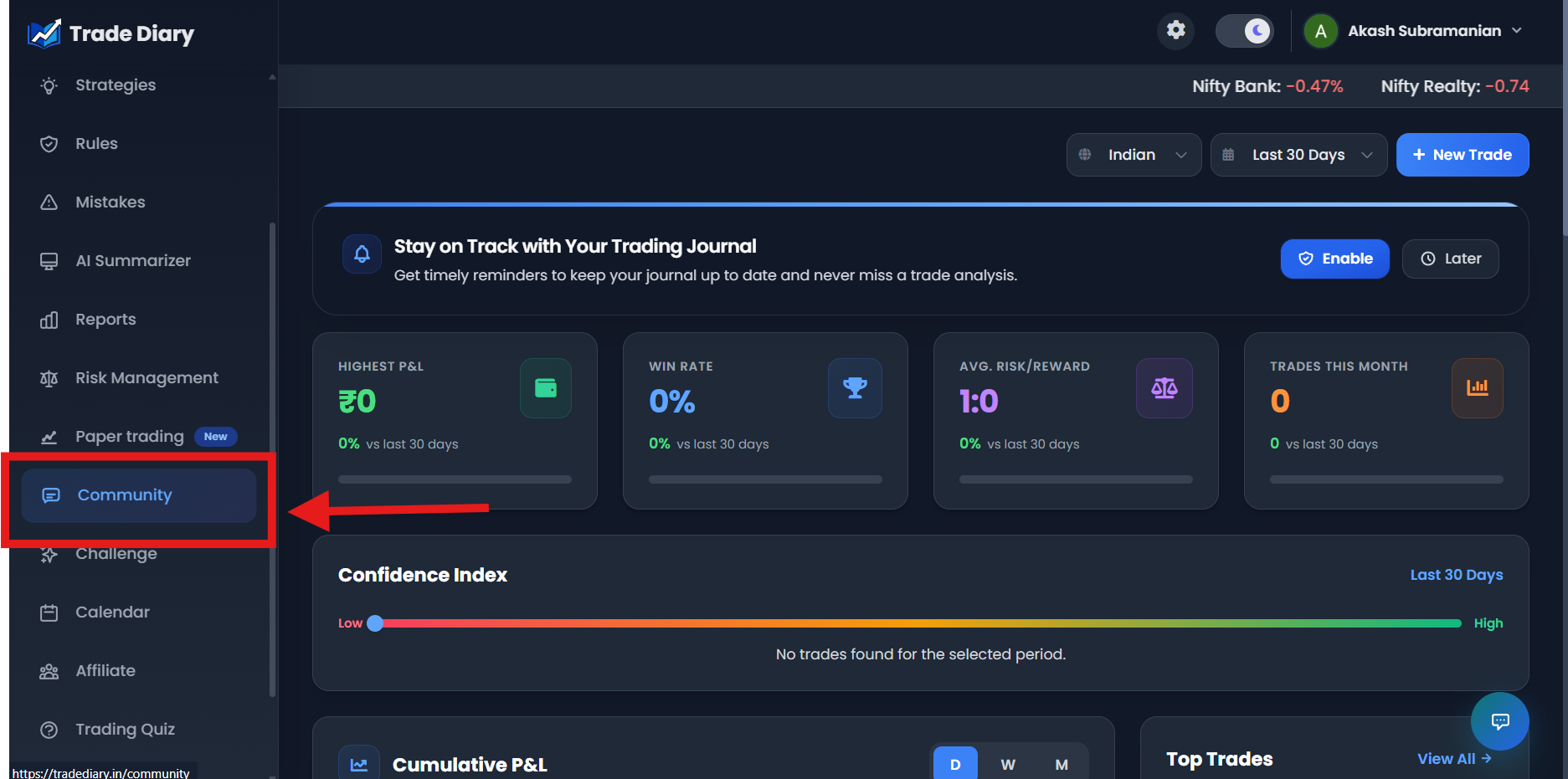
Dashboard side navigation with an arrow pointing to Community
01-navigate-to-community.pngSelect Join and confirm the circle
Find the circle you want and select Join. A confirmation window explains that joining unlocks the room’s messages and live chat. Select Join Circle. TradeDiary marks the membership as Joined and opens the room.
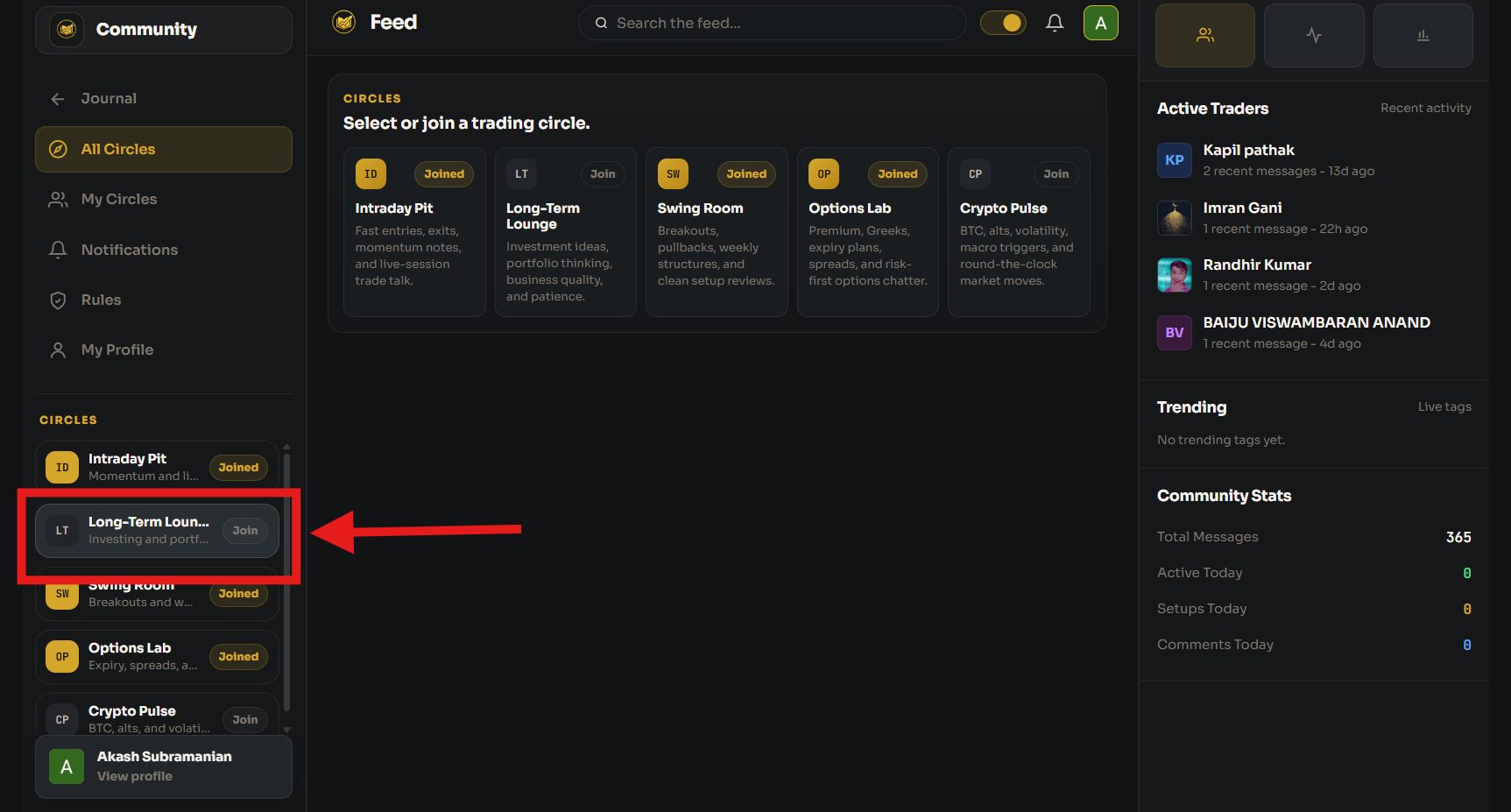
Circle card and Join Circle confirmation with the join action highlighted
02-join-a-trading-circle.pngChat and share a trading insight
After joining, the circle opens with its description, existing messages, and a composer. Enter your observation in the message field. To add visual context, select Image and choose a supported JPEG, PNG, GIF, or WebP file. Review the message and select Send.
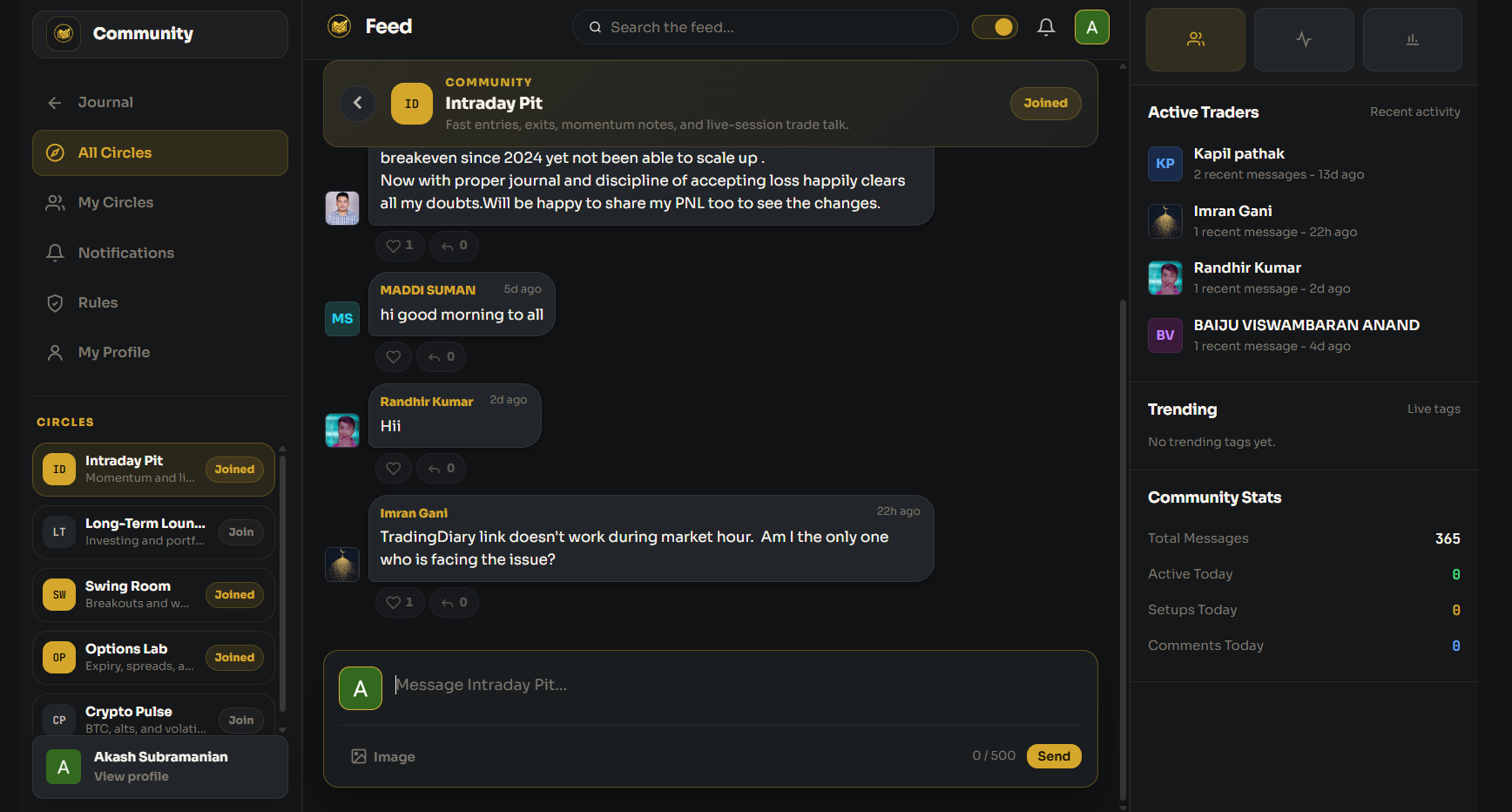
Joined circle with its chat and message or image composer highlighted
03-chat-and-share-insights.pngWhat makes an insight useful?
- State the context: include the market, timeframe, and conditions behind the observation.
- Explain the reasoning: describe what supports or invalidates the idea instead of posting only a direction.
- Label uncertainty: separate a possible scenario from a confirmed outcome.
- Use clear images: crop unrelated information and mark the level or pattern being discussed.
Continue the discussion
Use likes to acknowledge useful messages, comments or replies to ask for clarification, Follow to keep track of a trader’s contributions, and Share when you want to pass a message along.
Find the discussions relevant to you
The Community includes several filters so you do not need to read every message in chronological order.
Search
Search the feed for a trader, market term, setup, or other relevant text.
Feed tabs
Switch between All, Following, Trades, Setups, and your own messages under Mine.
Sort
Order messages by Latest, Trending, or Most Liked.
Asset class
Focus on Equity, Options, Futures, Crypto, Forex, or all assets.
Use My Circles to return to joined rooms, Notifications to review activity involving your contributions, and My Profile to manage how you appear to other community members.
Share responsibly and protect your privacy
A strong trading community improves when members explain their thinking, acknowledge uncertainty, and respect different risk limits. Treat all posts as discussion, not instructions to copy.
Contribute constructively
- Explain the setup and invalidation
- Disclose whether a trade is planned, open, or closed
- Ask specific, respectful questions
- Correct inaccurate information openly
Keep sensitive data private
- Passwords, OTPs, or API credentials
- Broker login or account identifiers
- Unredacted personal or payment details
- Claims of guaranteed profit or risk-free returns
Before uploading a screenshot, inspect the entire image for account numbers, names, balances, order IDs, notifications, or browser tabs that should not be public.
Common Community mistakes
Posting in the wrong circle. Choose the room that best matches the market and style.
Sharing a direction without reasoning. “Buy now” teaches less than a setup with context and invalidation.
Copying another trader blindly. Their timeframe, account size, risk tolerance, and exit plan may be different from yours.
Uploading private information. Redact sensitive data before sharing any broker or chart screenshot.
Treating popularity as proof. Likes and rankings do not validate a strategy or guarantee an outcome.
Common questions
Which circles are available?
The current circles are Intraday Pit, Long-Term Lounge, Swing Room, Options Lab, and Crypto Pulse.
Do I have to join before chatting?
Yes. You must join a specific circle before TradeDiary unlocks that room’s messages and composer.
Can I leave a circle later?
Yes. Select its Joined control to leave. If that room is currently open, TradeDiary returns you to the broader feed.
Are community posts trading advice?
No. Treat posts as discussion and educational perspectives. Verify information independently and make decisions using your own plan and risk controls.
Share the reasoning, not just the result.
Join the right circle, ask better questions, and turn community insights into independent research.